Google Translate is a tool that allows you to translate text, documents and webpages between over 50 languages.
Showing posts with label Google. Show all posts
Showing posts with label Google. Show all posts
18 Nov 2009


5 Oct 2008
SMS Channel Google
Google has come up with a new service called SMS Channel Google. It is a SMS based application for mobile phones. It is still in its "Labs" but seems to be a promising service.
One requires to register a Cell Phone number and verify it by using the Code sent via SMS. After successful registration process, one can subscribe to various SMS channels. It will keep on alerting through SMSes just like what egroups do through emails.

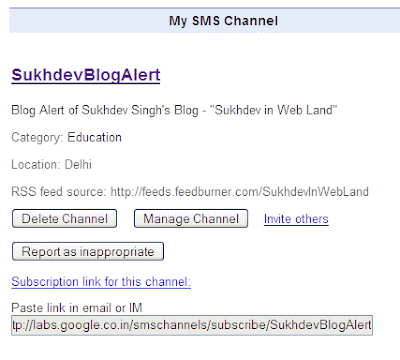
One can also create his own channel. Just check out the one I have created for this blog.
One requires to register a Cell Phone number and verify it by using the Code sent via SMS. After successful registration process, one can subscribe to various SMS channels. It will keep on alerting through SMSes just like what egroups do through emails.

One can also create his own channel. Just check out the one I have created for this blog.

3 Sept 2008
Why Google Chrome won't be my Browser
Downloaded and installed Google Chrome. Installing was done without any problem. Just for the last step - it required to close down my Firefox which was installing it. It wanted to copy its settings. Fine, closed the Firefox, but installation pop up of Chrome was refusing to die. The "x" was inactive. Anyway killed it and started the Chrome. Entered Gmail URL, it opens up a pop-up for Proxy Authentication. Ok done, but noticed that it does not provide for saving the authentication which normally other browsers do. So every time I needed to start a session, it prompts for authentication. Very irritating!
The technology behind Google Chrome has been explained through a 38 pages cartoon booklet. This way of explaining is quite innovative. So I was quick to learn that big advantage of Chrome lies in multiprocessing. If a "Tab" gets struck, the whole Chrome need not be killed.
However, I still can not afford to shift from Firefox to Chrome. I am used to many 'add-ons' or Plug-ins available for Firefox. Hope such add-ons are also available for Chrome in near future.
However, I still can not afford to shift from Firefox to Chrome. I am used to many 'add-ons' or Plug-ins available for Firefox. Hope such add-ons are also available for Chrome in near future.
25 Jul 2008
Google's Wikipedia - Knol
Google has released for public its Wikipedia known asKnol (a unit of knowledge).
9 Jul 2008
Philosophy behind Google ranking:
Google Fellow Amit Singhal shares the philosophies behind Google Ranking in their Official Google Blog. The post, Introduction to Google Ranking, lists following philosophies:
1) Best locally relevant results served globally.
2) Keep it simple.
3) No manual intervention.
15 Jun 2008
PDF File support now available in Google Docs
Google Docs now has added support for PDF Files. I you select
Upload a File option, you will notice the following towards the bottom right hand position:
The uploaded PDF file is shown as image. You can print it or share it. So, editing is not available yet.
Upload a File option, you will notice the following towards the bottom right hand position:
"PDF Files (up to 10 MB from your computer, 2 MB from the web)"
The uploaded PDF file is shown as image. You can print it or share it. So, editing is not available yet.
12 Jun 2008
Another way to embed RSS Feeds in your web page or blog
Digital Inspiration has an interesting tutorial to aggregate feeds from various sources. The technique uses Google Docs' Spreadsheet. It uses the spreadsheet formulas - "ImportFeed "and "Hyperlink" to display feed items and hyperlink these to original URLs. This spreadsheet is then published and html code is generated. The code can be embedded in a web page or blog.
9 Jun 2008
Google AJAX Feed API
Google AJAX Feed API - Dynamic Feed Control Wizard - allows to embed a Dynamic Feed Control on web page.
6 May 2008
Google Reader evolving into a Social Networking Site?
Just wondering whether Google Reader is gradually evolving into a Social Networking Site? It has now improved its Sharing options. It has become easier to share your favorite sites with your friends. It provides for a “Note in Reader” link that can be dragged and dropped in your browser’s bookmarks bar. Once that is done, you are ready to share your favorite sites or the sites you just discovered. Select a relevant portion of the site you wish to share through Google Reader and click on “Note in Reader”. (Well text selection is optional, but it is also better to be focused). A window will open up with title of the site being shared with selected text already filled. Now just put your annotation (yet another optional step) about the site (your friends might like to know as why you are sharing?) and click “Post Item”. You have now shared an item through Google Reader. You can email the links of shared items to your friends, share through your blog (ready to add clip in Blogger available) or copy and paste relevant HTML snippet in your site.
Will Google Reader continue to add such features and evolve into a Social Networking Site? It can add profiles, favorite contacts, communities, pictures and all that stuff. With all these usual social networking stuff powered with shared knowledge (sites), Google Reader could become “Google Wisdom” for a participating virtual community.21 Apr 2008
Using Google Docs for Conducting Research and Surveys Online - Easy and Simple
If you are doing some research or survey, you know how difficult and time consuming it is to prepare questionnaire, mail it and tabulate the responses.
However, today a number of online survey tools and services are available, like the SurveyMonkey. Unfortunately, there are restrictions for free versions of such online survey tools. If you don’t like restrictions, move on to Google Docs. It is an Online Office suite from Google - http://docs.google.com - still, it can prove to be a handy tool for conducting research or survey online. Thanks to some new features added to it. These features enable Questionnaire / Survey Forms creation and emailing them directly. The beauty of Google Docs is that there is always a background spreadsheet linked for each such form. The responses to the questions are automatically added to spreadsheet in Google Docs.
With Google Docs, you can create your Online Survey / Research Forms. Send these through Email or simply send the unique URL of the online survey form. Survey participants do not require any Sign-in for filling online survey forms. Their responses can be filled out directly from email client. As already told, responses are automatically added to a Linked Spreadsheet. This spreadsheet can be used to further analyse the responses. It is easy, simple and fun with Google Docs.
For creating a Survey Form, visit Google Docs. Use your Gmail User ID and Password to login. If you do not have an Account with Google, better create it now. Once logged in, select a new spreadsheet. Make it sharable by clicking on “Share” tab. It will prompt to enter the title for the spreadsheet and save it. After that, from available options, select “to fill out a form”. Next step is to create a Survey Form. It is very simple and intuitive. Once the form is complete, you can preview it and send it by emailing it to large number of participants. The Google Docs responds back with a confirmatory email. As the participants start filling up the form, data is captured in a linked spreadsheet at back.
I have created a small presentation for explaining it.
The same is embedded here as well.

9 Mar 2008
Google Newsreel - Broken?

We are using Google Newsreel on our Balachaur Blog. The keyword used is "balachaur". It used to work fine by culling out news related to Balachaur ( a small town in Punjab). However today I have observed that it is showing all irrelevant news (from US).
Others have also reported problems with Google Newsreel in past. Something wrong?
Others have also reported problems with Google Newsreel in past. Something wrong?
28 Feb 2008
Google Sites
Google Sites
..a new offering from Google Apps, makes creating a team site as easy as editing a document..
Subscribe to:
Posts (Atom)